I have had the need to make users without any regular WordPress capabilities, but I need them to edit/view some things in the admin area. This is easy enough for standard WordPress menu items. But what about custom menus? You can add the menu slug to all of the users that you want to explicitly edit/view this menu. However, editing roles can be bothersome if you either a) have a lot or b) just don't want to mess with capabilities. By specifying the menu slug for the role would eliminate this menu for any other user that doesn't have the capability. Therefore, admins by default would not be able to view the menu anymore without explicitly adding a capability to the user.
I recently decided to start making models after watching a ton of cool videos on Tested's YouTube Channel. Specifically there is a video of some Battlestar Galactica Models with Aaron Douglas. This past weekend I purchased three models and set out to build them. They were really fun. Here are some links to view some timelapse videos:
I also built the Viper MKII, but my phone died during the timelapse. You can see it unpainted in the other Viper video.
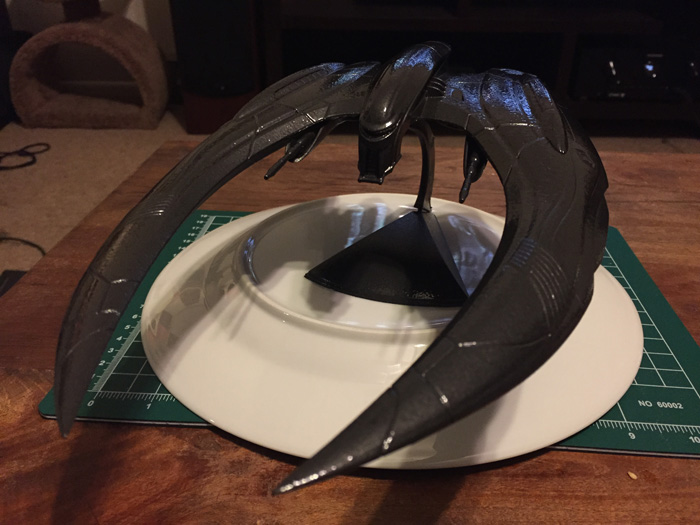
Here is an image of the Cylon Raider painted up. I took some liberties and made it dark gray/black with a bronze tint because i liked it more menacing like this.
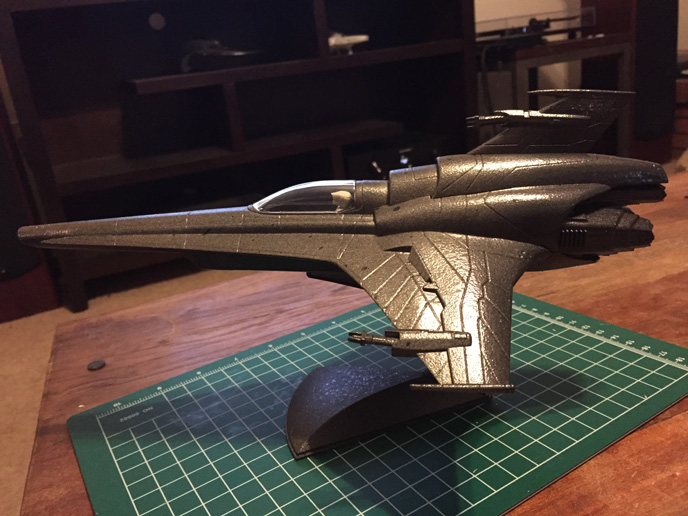
Here is the finished Viper MKVII
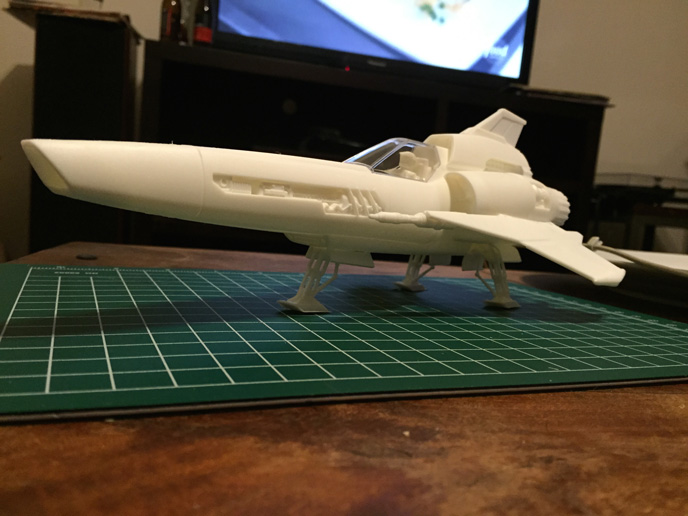
Here is the unpainted Viper MKII. This was fun and challenging as the the landing gear and flaps needed to be assembled.
I would like to take the opportunity to introduce the talented Community Funded Team. I have been working with these amazing people for over 2 and half years and we recently updated our "meet the team" page. Please check it out to learn more about the people and passion behind Community Funded.
I recently completed a site design overhaul for Competition Dynamics. They hold world-class, cutting-edge competitive practical shooting events with an unmatched level of professionalism and operational excellence. They bring new practical and field competition concepts to reality. Their staff has a proven track record of running challenging, safe, and fair 3-Gun, multi-gun, and long-range matches. They have been involved in administering many of the most influential field matches of the last decade and have redefined what field challenges can be applied to a competition format. They have the expertise and experience to run world-class practical shooting events.
The site is not built with WordPress, but I installed WordPress for the blog. I created a WordPress API that allows these articles to be pulled onto the CD site on the homepage and on full article pages. It allows for pulling specific post types, postmeta, and taxonomies.
I just want to say that for any of you that use my admin post searching plugin (link), i have updated it to search not only on the post title, but also the post id. I was watching a client look for a post by ID and it him me that i could just add this functionality to the search plugin.
I bought my raspberry pi a few months ago and played with it a lot at first and then put it aside until I finally came up with a use for it. I installed Debian, nginx, and wrote a small php script (run via a cron job) that can check a url to see if it is live. If the pi finds that the server is down, then I have it send me a text message to alert me so that I can respond as quickly as possible.
So like most programmers, I do not like to have to replicate code or write the same HTML structures over and over again. This is a PHP Class that allows you to write HTML Tables without writing a single line of HTML.
Very often I have been asked to make “next/previous” post buttons from within a WordPress post editor. I figured a super simple slick interface that allows a user to start typing and see a list of posts that they could click on and then jump straight to that post’s editor would be nice.
I have made some static webpages recently and I have been meaning to make an extremely simple template engine that will drive these sites. I always have a library of functions for getting html headers, footers and common functions, but I didn't have the template portion. Here is a very easy to implement system that allows you to make static websites that do not need databases that load very fast. It basically lets you define a set of pages and then will automatically serve the correct page from a folder. This is instead of having to make new folders and index files for each new page.
This is a WordPress plugin I wrote that stores information about slider images in the database. It also gives you a template tag that you can use to loop over the images and implement your own JS Slider in your theme. It has a management page in the wp-admin dashboard so that you can add a title, description, link to follow, image url, and the ability to make it active or inactive.
As far as I can tell, there is no setting in the app to send audio to an AppleTV. However!
I was watching a couple of YouTube videos from my iPhone streamed to the AppleTV. I then went to the Phish App to listen to last night's MSG Show. To my surprise it started playing through the AppleTV. I tested this and realized that after choosing the output from the YouTube App to be the Apple TV, that it then became the default output for the Phish App and voilà!
I know this has nothing to do with web development, but this is a trick i deemed important to share.
This simple code will allow you to load all of your themes css files into one request without a plugin. I have not yet found a plugin that works with other plugins nicely as not all plugin authors play by the rules when enqueueing scripts and styles. So i figured that I would start with my theme. I wrote my own theme for this site based on the Twitter Bootstrap. On its own, there would be a request for the bootstrap css file and one custom one for my theme. And the javascripts would be one for the bootstrap and one for my custom js.
Awhile back, I created a plugin that would allow you to put a template tag on your site to display popular posts based on the number of comments on posts. It was quick, dirty and not the best code I have ever written.
I have completely rebuilt it using the WordPress Widget system so you can add it to your sidebar via the Widgets Administration panel.
This widget works based on the number of comments on your posts. It takes the most commented post and gives it a value of 1. You can then pick up to three levels to compare the other number of comments per post. You can also pick the number of posts to display in your sidebar.
Here's a quick overview of my first impressions of OS X Mountain Lion. Full article contains descriptions of Notification Center, Safari, The Dock, and Notes
I would like to take this opportunity to explain some of the cool features and projects that are on Community Funded.  For a little background, I have been working on this site since I was brought in as a consultant in August, and became the Director of Development in November.  The website is a crowd funding website that takes advantage of the power of Mega Community Collaboration (MC2).  Here is what this about: MC² happens when motivated groups of individuals and organizations focus on common goals to maximize their community’s resources. Modern technology allows for the connection of many diverse communities to form The Community – which possesses all the resources and funds needed to make incredible things happen. Community Funded will transform this potential into energy through the power of MC² .
It has been awhile since I have written, but I wanted to detail how and when to use WordPress transients. First off, what are transients? WordPress has a great API for storing data that might be either the results of an expensive/complex query, or data that does not change that often. The rationale behind these is to make the pages load faster without having to do the expensive queries for every user that visits your site. They offer us an expiration date so that the data can be regenerated on a schedule.
I have two examples in the full article for you to review. Hopefully they will help you make your site more efficient.
So I have been working on a project that has become my main focus. I am really proud to be the developer for www.communityfunded.com. We currently have a splash page up that allows the public to register as a user.
Here is a brief summary of the project:
Community Funded will connect people, ideas and resources in historic new ways, empowering our communities and promoting "grass-roots economic recovery." Anything’s possible when it’s Community Funded.
Please sign up to be a part of something really special.
Here is a quick and dirty way to keep your users out of the WP-ADMIN area. Â I have not found a good way to redirect a user from the wp-login.php page to a custom page and not profile.php. (anyone knows, please let me know : > ). I needed this as i had a front end system for users to manage their profiles. Â That part needed to look like the regular theme and not like the admin area.
Here is some handy code that allows you to upload image(s) from a form on the front end of your WordPress site and have it become attached to a specific post. There is optional code that allows you to make the post the featured image (post thumbnail) as well.
So you have a ton of categories and there are a lot of child categories at the list and the post editor has become unruly? In order to change a posts' category or to add it to a new one the list is unmanageable. Here is a jQuery code snippet that you can use to make the categories collapsable. It removes the label functionality. You cannot click on the name to select the item's checkbox, but it now allows you to click on the name to expand the categories.
This simple image class will allow you to get an image from your server to dynamically resize it and center it top/bottom and left/right in a square box. If you have some images that are all good kb size but are a bit random in their dimensions, you can use this class to make them fit dynamically in a box. It will make images that are larger than the bounds of the box smaller, but will not adjust the size of images that are smaller than then bounds. That would make them blurry, so instead it just makes them centered in the box.
I am using this in a scenario where there are images that have been uploaded to the server that are very small 200x200 and rather large 1000x1200. The size of my display box in this example is 400x400.
Introducing a new tool! This site lets you create a snippet that you can embed or give to someone else to display your blog articles outside of your site. I built this as there are some hosted shopping cart solutions where you cannot run PHP, and you cannot style elements in an iFrame not from your own site. By creating WordPressFeeder.com, I got around both of these issues. The generated code creates stylable elements on your external site.
Here is a compact way to replicate jQuery UI tabs without the UI. I wrote this code to account for unlimited tabs and to create dynamic "selected" class on the clicked item and removes the class when you click on another tab. This lends itself to easier styling of the tabs as well.
So when WordPress introduced the wp_nav_menu() function, it made it easier to create navigation menus for the average user. You can create dropdown navigation simply moving the items around in the admin -> appearance -> menu section of your dashboard. This tutorial requires jQuery, but is not a jQuery plugin.
I was recently working on a BuddyPress site where the site owner wanted everyone who signed up to be a friend of a "support" user. He wanted people to be able to direct message this account, and in this case, he had Comet Chat installed. This meant that if "support" were online, then anyone could chat with support. I dug into the BuddyPress DB to see how friends were enabled and wrote this function that you can put into your themes functions.php to enable.
This bit of code allows you to check to see if the current category archive page has child categories. I needed to check this on a site where until you were viewing a category that has no children, you saw category listing pages and then when the category has no children, you see the listing of posts for that category at the end of the line.
I have a site where i need to allow people to upload a YouTube URL. I want to just store the ID in the MySQL DB and I need to be able to retrieve it later for embedding on the site. Sometimes people will paste a url cleanly like this...
"http://www.youtube.com/watch?v=P22G8YHveEg"
..where you could just explode the values at the equals sign and get the second item in the array to parse out the YouTube ID. It is nice to just have the YouTube ID so that you can use it as you need it to retrieve any info about the video that you might need.
 Matthew A Price


 ^
^